
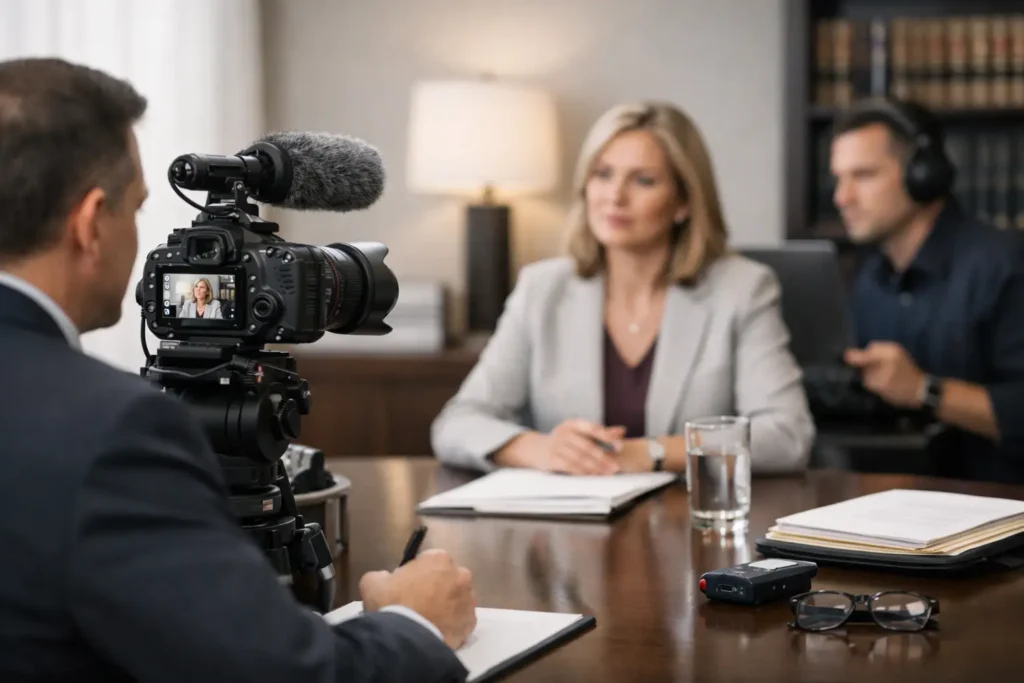
A deposition rarely goes off script in the way anyone hopes. A witness arrives remotely instead of in person. An exhibit format changes at the last minute. Audio from one participant starts clipping just as testimony turns critical. That is why a dependable deposition videography workflow matters. For legal teams, the issue is not just getting video captured. It is getting usable, accurate, court-ready material without adding stress to a schedule that is already tight.
In legal video, workflow is not a buzzword. It is the chain of decisions and controls that protects the record. When that chain is strong, attorneys can stay focused on testimony, strategy, and deadlines. When it is weak, small production issues can create expensive problems later in editing, transcript sync, impeachment preparation, or courtroom playback.
What a deposition videography workflow should accomplish
A strong deposition videography workflow does three things at once. It preserves the integrity of the testimony, keeps the proceeding efficient, and produces deliverables that legal teams can actually use. Those goals sound straightforward, but each one depends on planning before the first question is asked.
For example, the best workflow for an in-person expert deposition may not be the best workflow for a remote treating physician or a hybrid corporate witness with counsel in multiple locations. The legal standard stays the same, but the production plan changes. Camera placement, audio routing, backup recording, exhibit handling, and delivery timelines all need to match the format of the proceeding.
That is where experienced legal videography differs from general event or corporate video work. In a deposition, style does not matter nearly as much as accuracy, consistency, and procedural discipline. The video has to support the legal process, not compete with it.
Pre-deposition planning sets the tone
Most workflow problems show up on the record, but they start before the deposition begins. Good planning starts with the scheduling details that attorneys and litigation support teams care about most: date, time, witness location, case needs, appearance format, and expected deliverables.
If the deposition is remote or hybrid, technology planning becomes part of the evidentiary planning. The videographer needs to know who will appear by Zoom, where the witness will be located, whether an interpreter is involved, how exhibits will be introduced, and who controls the virtual room. A simple oversight here can create avoidable confusion when testimony starts.
For in-person matters, room conditions deserve equal attention. Lighting, power access, seating arrangements, background distractions, HVAC noise, and conference room acoustics all affect the quality of the record. A seasoned legal video team does not wait to discover these issues after counsel is ready to proceed.
This stage is also where turnaround expectations should be made clear. Some matters require standard processing. Others need same-day clips, rapid transcript synchronization, or edits tied to mediation and trial deadlines. Workflow is stronger when the deliverable plan is built in from the beginning rather than added as an emergency request later.
On-site setup is where reliability becomes visible
A professional setup should feel calm and unobtrusive. That is usually a sign that the technical work is being handled correctly. Cameras are positioned for a clean and consistent witness image. Audio is tested carefully, not casually. Backup systems are active. The videographer confirms the room setup and recording path before the oath and before critical testimony starts.
This matters because deposition audio is often less forgiving than the video image. A witness can still be identifiable in imperfect lighting, but muffled, distorted, or uneven sound can reduce the value of the entire record. In multi-party proceedings, especially hybrid ones, audio management is often the deciding factor between a usable video and a frustrating one.
The other visible part of setup is professionalism. Legal teams need a videographer who understands pacing, formality, and courtroom-adjacent expectations. The goal is not to become part of the proceeding. The goal is to support it efficiently and without distraction.
The recording phase of the deposition videography workflow
Once the deposition begins, consistency matters more than creativity. The videographer should follow established legal video procedures, maintain a stable record, and document the session in a way that aligns with downstream use. That includes proper opening statements on video when required, reliable witness framing, and disciplined monitoring throughout the session.
A common misconception is that once recording starts, the workflow is mostly complete. In reality, the live portion requires continuous judgment. If a remote participant drops out, if audio levels shift, or if counsel changes the exhibit process midstream, the videographer has to adapt without compromising the record.
This is especially true in Zoom and hybrid depositions. These formats add convenience, but they also introduce more failure points. Internet instability, echo, duplicate audio paths, participant muting errors, and screen-share confusion can all interfere with the final product. A legal video specialist anticipates those issues and manages around them rather than reacting after the fact.
There is also a practical balance to strike. Attorneys want the process to move efficiently. At the same time, no one benefits from rushing past technical issues that should be corrected immediately. The right workflow supports both efficiency and control.
Managing exhibits and the transcript relationship
Video by itself is rarely the whole story. In many cases, its long-term value depends on how well it works alongside exhibits and the certified transcript. That is why the deposition videography workflow should account for post-production needs before the deposition ever ends.
If exhibits are shown on screen, referenced remotely, or handled in a hybrid environment, the capture process should preserve clarity around what the witness is reviewing and when. This does not always require a complicated production approach, but it does require a deliberate one.
The relationship between video and transcript becomes even more important when legal teams anticipate impeachment designations, settlement presentations, mediation clips, or trial playback. Transcript synchronization is only as efficient as the underlying record allows. Clean starts and stops, accurate time references, and consistent capture make later work faster and more precise.
Post-production is where workflow proves its value
The most overlooked part of legal video is what happens after everyone leaves the room. A clean deposition file still needs to be processed, checked, labeled, formatted, and delivered correctly. If synchronization, clip extraction, or legal editing is part of the request, the workflow must support those steps without introducing delay or error.
This is where specialized experience makes a measurable difference. Legal teams do not need generic media files that require extra interpretation. They need organized deliverables, dependable formatting, and responsiveness that matches court schedules. A vendor who understands litigation support will treat chain of custody, file naming, quality control, and deadline management as core parts of the job, not as administrative afterthoughts.
There is also an important trade-off here. Faster is valuable, but not if speed replaces verification. The best post-production workflows are built for both. They move quickly because the process is disciplined, not because corners are cut.
Why experience changes the workflow
Not every deposition requires the same level of production complexity, but every deposition benefits from experienced judgment. A straightforward single-camera deposition in a law office should feel simple because the workflow has been refined. A multi-location hybrid deposition with aggressive deadlines should still feel controlled because the team has handled similar matters before.
That difference shows up in small moments. It is in how pre-session checks are run, how room issues are solved, how counsel is updated when formats shift, and how final deliverables are prepared for real litigation use. For attorneys and legal staff, those details reduce oversight burden. You should not have to teach your video vendor how legal proceedings work.
For Seattle-area firms handling high-stakes matters, that level of support is often what separates a vendor from a reliable litigation partner. Royal Video Productions has built its reputation on exactly that standard: experienced legal video execution, responsive service, and deliverables that hold up under deadline pressure.
A workflow that reduces risk for legal teams
The best deposition videography workflow is not the most elaborate one. It is the one that fits the proceeding, protects the record, and makes the next step easier for counsel. Sometimes that means a straightforward in-person setup executed flawlessly. Sometimes it means careful coordination across remote participants, synced transcripts, and edited clips prepared for presentation.
What does not change is the purpose. Legal video should reduce friction, not add it. When the workflow is handled correctly, attorneys can prepare the case instead of managing production problems. That is the standard worth asking for before the camera is ever turned on.