
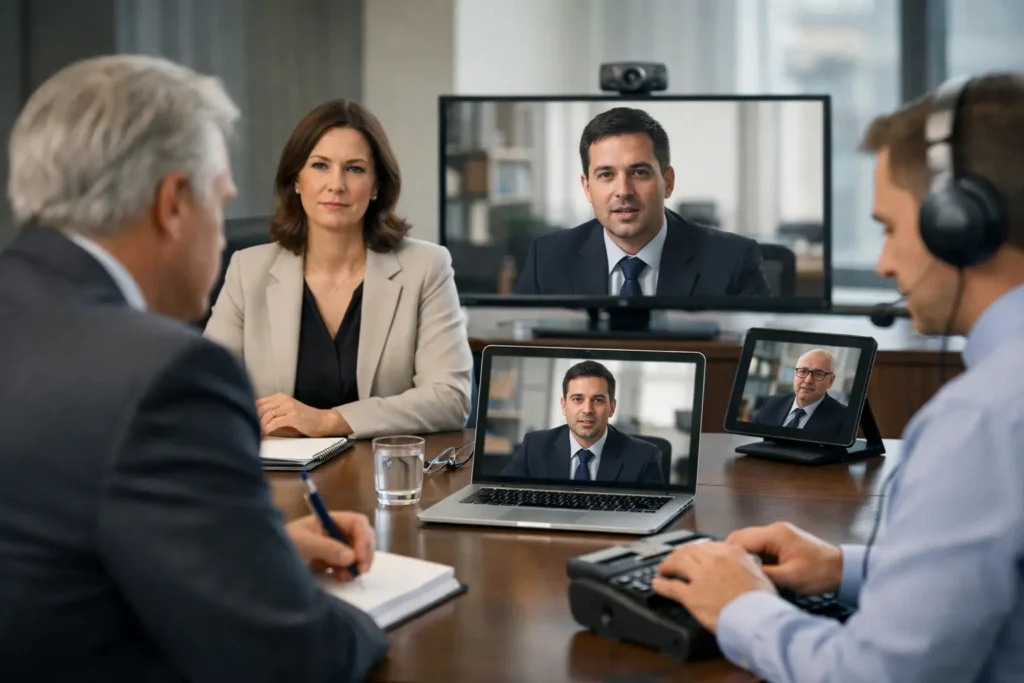
When a key witness is remote, defense counsel is in the room, and the court reporter needs a clean record, small mistakes become expensive fast. Knowing how to coordinate hybrid depositions is less about adding technology and more about controlling the moving parts before they disrupt testimony, exhibits, or the record.
Hybrid depositions can work extremely well, but they are less forgiving than fully in-person or fully remote proceedings. You are managing two environments at once – the physical conference room and the remote platform. If either side is poorly prepared, the result is avoidable delay, unclear audio, exhibit confusion, or testimony that becomes harder to use later in motion practice or at trial.
How to coordinate hybrid depositions without avoidable problems
The strongest hybrid depositions start with one decision: assign clear production responsibility early. Too many matters drift into a shared-assumption model where the noticing attorney, paralegal, court reporter, and video team each believe someone else is handling the technical details. That is usually where trouble starts.
One person should own logistics from scheduling through start time. In most firms, that means a paralegal, legal assistant, or litigation support professional working from a written checklist. That person does not need to run the video feed personally, but they do need authority to confirm who is attending in person, who is appearing remotely, what platform is being used, how exhibits will be handled, and whether a legal videographer is producing the official record.
This is also the stage to confirm the purpose of the deposition video. If the footage may later be used for impeachment, trial presentation, settlement work, or transcript synchronization, the production standard needs to reflect that from the outset. A hybrid setup built only for convenience may not serve later litigation needs very well.
Start with attendance, room layout, and the official record
Hybrid depositions fail most often when the attendance plan is vague. Before the date is finalized, confirm exactly where the witness will be, whether questioning counsel will appear in person or remotely, whether defending counsel will share the room, and whether an interpreter, corporate representative, or consulting expert needs separate access.
That information affects room placement, camera angles, microphone coverage, and even the timing of setup. If the witness is in the room with one attorney while another appears remotely, you need to avoid creating a dynamic where one participant cannot be heard clearly or where the witness keeps turning away from the camera and microphone while responding.
The official record should also be settled in advance. Determine who is administering the oath, whether the court reporter is remote or in person, and whether the legal videographer is creating a separate certified video record. In high-stakes matters, that distinction matters. Consumer-grade meeting recordings may be adequate for internal reference, but they are not a substitute for professionally captured legal video when quality, chain of custody, and courtroom use are in play.
Treat audio as the first priority, not video
Attorneys understandably focus on whether everyone can be seen. In practice, bad audio does more damage than imperfect framing. If the reporter cannot hear every speaker clearly, or if cross-talk from the room muddies objections and answers, you risk a weaker transcript and more cleanup after the fact.
The room should be selected for sound control, not just appearance. Hard surfaces, HVAC noise, open office spill, and speakerphones placed too far from the witness all create problems that no one wants to diagnose on the record. A dedicated microphone plan is better than relying on a laptop in the middle of a table.
This is one of the biggest trade-offs in hybrid work. A quick, low-cost setup may feel efficient, but if it produces inconsistent audio, the savings disappear in delays, restarts, and reduced usability later. For depositions with meaningful exposure, expert testimony, or probable video designations, professional audio capture is not an extra. It is part of protecting the record.
How to coordinate hybrid depositions when exhibits matter
Exhibits are where many otherwise smooth hybrid depositions break down. The issue is not simply sharing documents. The issue is making sure every participant is looking at the same exhibit, the same page, at the same time, while preserving a clean record of what was marked and discussed.
You should decide in advance whether exhibits will be pre-marked, marked in real time, or managed through a dedicated exhibit platform. Each approach has advantages. Pre-marking can save time in straightforward matters. Real-time marking can be better when strategy or objections make pre-distribution impractical. The right choice depends on case posture, witness sensitivity, and the volume of documents expected.
Whatever method you choose, communicate it to everyone before the deposition starts. The witness should know how exhibits will appear. Counsel should know who is controlling the screen share. The reporter should know how marked exhibits will be identified and circulated. If a legal video team is involved, they should know whether picture-in-picture, source capture, or exhibit display coordination is expected.
A brief pre-session exhibit test is worth the time. Confirm that the remote witness can view, enlarge, and scroll documents without lag. Confirm that confidential materials are not left visible between exhibits. Confirm that the room display does not create glare or force the witness to turn away from the camera for extended periods.
Build a real pre-deposition tech check
A calendar invite is not a tech check. For hybrid depositions, a true preflight should happen before the day of testimony, especially when the witness is remote or unfamiliar with the platform.
That check should verify internet stability, camera position, microphone quality, lighting, exhibit display, screen-sharing permissions, and backup contact information. If the witness is remote from home or a temporary office, confirm the environment is private and free from likely interruptions. If the witness is in a conference room, verify that the room setup supports both the remote attendees and the in-room questioning dynamic.
This is also when you identify backup plans. If the platform fails, what is the alternate connection method? If a participant drops, who pauses the record? If an exhibit cannot be opened, who sends the replacement file? Good hybrid coordination is not about pretending problems will not occur. It is about deciding ahead of time how you will handle them.
Use a legal videographer when the video may need to work later
There is a difference between capturing that a deposition happened and producing video that can stand up under later scrutiny. If the testimony may be used in mediation, impeachment, trial playback, or synchronized presentation, production decisions made on the front end matter.
A legal videographer helps control framing, witness presentation, audio clarity, on-the-record procedures, and file quality. Just as important, that specialist understands the rhythm of legal proceedings. They know when not to interrupt, how to coordinate with the reporter, and how to keep the process moving without asking counsel to become de facto technical support.
For Seattle-area firms handling complex or deadline-driven matters, that kind of support often saves more time than it costs. Royal Video Productions has built its reputation on exactly this point: legal video is not generic event coverage. It is specialized litigation support work, and the margin for error is much smaller.
Keep the witness experience under control
Witness management is often overlooked in discussions of how to coordinate hybrid depositions, yet it can shape the quality of the testimony. A witness who is remote and distracted, poorly framed, or uncertain where to look may come across very differently than intended.
Basic preparation helps. Tell the witness where to position the camera, how to sit in relation to the screen, what to do when an exhibit is introduced, and how to avoid talking over counsel. If the witness is in person, make sure sightlines to counsel, camera, and documents do not force constant movement. If the witness is remote, encourage a neutral background, stable device placement, and a location that will remain quiet for the full session.
There is some judgment involved here. You do not want a setup so controlled that it appears staged. But you also do not want preventable distractions to affect how testimony is perceived. Professionalism in presentation matters, especially when the video may later be shown outside the deposition room.
Plan for the deliverables before the deposition starts
The final coordination issue is often the one firms leave until too late: what needs to be delivered after the deposition, and when. If you know you may need transcript synchronization, edited clips, impeachment excerpts, or court-ready playback files, that should be discussed before recording begins.
File naming, speaker identification, exhibit references, and recording quality all affect the speed and accuracy of post-production. Fast turnaround is possible when the workflow is designed properly from the beginning. It becomes much harder when everyone assumes the raw recording alone will be enough.
That is especially true near motion deadlines or trial. The more intentional the capture, the more useful the deposition becomes later.
Hybrid depositions are manageable when they are treated as legal proceedings first and tech events second. The best results come from clear ownership, tested systems, professional audio and video capture, and a plan for how the testimony will be used after the witness logs off. Get those pieces right, and the format stops being the challenge.